.png?width=200&height=58&name=Primary_White_XYCLE_Logo.png-09%20(2).png)
EF-compliant data quality assessments
XYCLE lets you complete an Environmental Footprint “EF”-compliant data quality assessment in the same place as your model. This follows Minviro’s EF DQA workflow: rate the relevant data quality indicators, record background data needs, calculate total environmental impact through EF normalisation and weighting, then use that contribution-based result to generate an overall weighted DQR. Under the EF method, the four data quality indicators are technological representativeness (TeR), geographical representativeness (GeR), time-related representativeness (TiR) and precision (P). The method also requires Data Needs Matrix “DNM” information to be included in the final report.
This article covers:
- what EF DQA is
- how to apply the indicators
- how to read the overall results
- what normalisation and weighting XYCLE performs behind the scenes
- what happens on export
1. Introduction to DQAs and the EF methodology
An EF data quality assessment is a structured way of judging how robust and representative your foreground and background data are. In the EF method, you assess four indicators:
- TeR: how well the data reflects the relevant technology
- GeR: how well the data reflects the relevant geography
- TiR: how recent and time-appropriate the data is
- P: how precise or variable the data is
Each indicator is scored from 1 to 5, where 1 is excellent and 5 is poor. These scores are then used to calculate a DQR, which is classified as Excellent, Very Good, Good, Fair or Poor. For EF studies, this final DQR is not based on a simple average of rows. It depends on each inventory item’s contribution to total environmental impact, which is why EF normalisation and weighting are required.
The EF method also uses a Data Needs Matrix (DNM) for background data. The DNM records how much influence the client has over each background process and therefore what type of data is appropriate. Its results must be included in the final EF report.
2. How to apply indicators
In practice, applying the indicators in XYCLE means rating your foreground data, assessing your background data needs, then rating the selected background datasets. That mirrors Minviro’s established workflow.
Foreground data
Use the company-specific matrix for client-provided foreground data. Under this matrix:
- P and TiR can only be rated up to 3
- TeR and GeR can only be rated up to 2
As a rule of thumb:
- P = 1 only applies where data is externally verified through a site visit by an EF-compliant verifier
- P = 2 applies where plausibility has been checked by the reviewer
- P = 3 applies where no EF plausibility check has taken place
- client foreground data should be within three years of the study to remain EF-compliant on TiR
Secondary foreground data and background data
Use the secondary-data matrix for:
- foreground proxy data in box or comparison models
- background data such as ecoinvent datasets
For secondary data:
- TiR depends on how far the dataset is beyond its time validity
- TeR depends on how closely the dataset matches the expected technology
- GeR depends on how closely the dataset matches the relevant geography
Precision for background data
Precision is handled slightly differently for background data. It is not included in the secondary-data matrix. Where the original source dataset already has a P score, that should be carried over. Where it does not, precision can be rated using the precision column from the company-specific matrix.
For ecoinvent background data, Minviro guidance gives a practical default:
- market activities typically map to P = 2
- transforming activities typically map to P = 1
DNM for background data
For each inventory item that needs a background datapoint, assign a DNM situation:
- Situation 1: the process is within your direct control
- Situation 2: the process is outside direct control, but company-specific information is available
- Situation 3: the process is outside direct control and company-specific information is not available, or the supply chain is not yet mapped
At Minviro, Situation 3 is often the most appropriate default where the modeller does not yet know the supplier, electricity source or exact production location. Situation 2B becomes more relevant once minor supplier-specific adjustments can be made to an existing EF-compliant dataset.
Important constraint
The EF method does not allow you to modify the scoring criteria in the rating matrices. XYCLE can help you apply the method consistently, but it should not redefine the method.
3. How to look at the overall results
Once your foreground and background ratings are in place, XYCLE calculates:
- criterion-level foreground DQR
- criterion-level background DQR
- criterion-level overall DQR
- an overall weighted average DQR for the product system
To view this, click on the Project Overview tab.
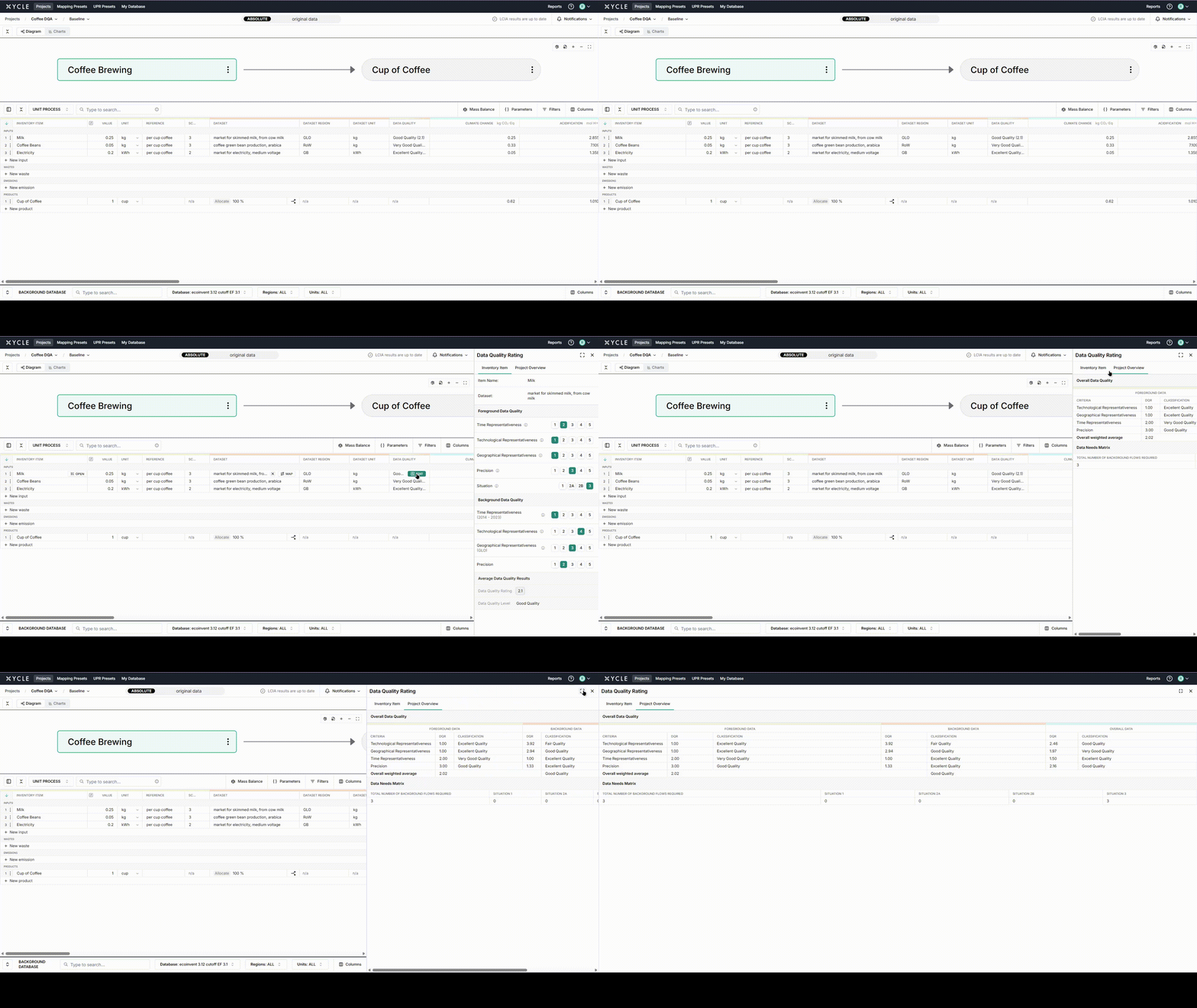
The classification bands are:
|
DQR result |
Classification |
|---|---|
|
≤ 1.5 |
Excellent |
|
>1.5 to ≤2.0 |
Very Good |
|
>2.0 to ≤3.0 |
Good |
|
>3.0 to ≤4.0 |
Fair |
|
>4.0 |
Poor |
The important thing to remember is that the overall EF DQR is contribution-weighted. A low-quality datapoint with very little impact on the system matters less than a low-quality datapoint driving a large share of the total environmental impact. That is why XYCLE first calculates contribution and rank before presenting the overall result.
4. The normalisation and weighting happening behind the scenes
Behind the scenes, XYCLE follows the same EF logic used in Minviro’s spreadsheet workflow.
Step 1: calculate LCIA results
XYCLE calculates LCIA across all 16 EF impact categories. EF DQA requires all categories because the final DQR is based on contribution to total environmental impact.
Step 2: normalise
Normalisation divides each LCIA result by the relevant EF normalisation factor. This produces dimensionless normalised results, making the categories comparable. Within the PEF method, these normalisation factors are expressed per capita based on a global value.
Formula: ImpactNormalised = Impact / NormalisationFactor
Step 3: weight
Weighting multiplies each normalised result by the relevant EF weighting factor. Weighting is mandatory in PEF studies and reflects the relative importance assigned to each impact category.
Formula: ImpactWeighted = ImpactNormalised × WeightingFactor
Step 4: aggregate
Weighted impacts are then aggregated to give a single overall score in points, representing total environmental impact.
Formula: ImpactTotal = Sum of weighted impacts
Step 5: rank contribution
Once each inventory item has a points-based contribution, XYCLE ranks items by their contribution to the total environmental impact. Those rankings and contribution percentages are then used to calculate the weighted DQR outputs.
5. What happens on export
Exporting the project now includes DQA information. The Inventory Items tab has the data quality ratings and level added to the end of each row.
There are two new additional tabs.
DQR Impact Scores
This contains the inventory but with the:
- DNM result,
- normalised score,
- weighted score,
- relative contribution to total environmental impact, and
- Rank.
DQR Summary
Contains the overall weighted average rating of the project split by criteria as well as foreground and background.