.png?width=200&height=58&name=Primary_White_XYCLE_Logo.png-09%20(2).png)
What this feature is
The mass balance validator checks whether mass in ≈ mass out for a UPR and, by extension, for your wider system. It calculates:
- Input mass (kg): total mass entering the boundary
- Output mass (kg): total mass leaving the boundary
- Discrepancy (kg): input mass − output mass
- Discrepancy (%): |discrepancy| ÷ input mass × 100
It warns when a UPR is outside tolerance but never blocks calculations.
When to use it (and when not to)
This feature works when a model has a clearly defined system boundary. This means defining what the input masses, wastes and emissions are as well as the mass of products. This feature is not well suited for projects with ambiguity in flows leaving and entering the boundary.
- It is not enabled by default.
Before you start
- The validator only includes inventory items with a recognised mass unit in XYCLE. Non-mass units (litres, MJ, “unit”) are ignored.
How it works
The validation works on the assumption that, if all the UPRs within a system are balanced, then the system is balanced. The checker has two views: one for the current UPR and one for the whole project.
The inventory, in any UPR or the all inventory view, is split into a number of sections which determine how mass behaves within a system.
|
Entering |
Leaving |
|
Intermediate inputs |
Wastes |
|
Inputs |
Emissions |
|
Products |
- Items in the entering column add to the input mass, while items in the leaving column add to the output mass.
- The outputs are subtracted from the inputs to calculate the balance referred to as discrepancy within the software.
- Inventory items must have a recognised unit of mass within XYCLE to be considered in the calculation—all units of mass are converted to kg for the calculation. These conversions and accepted units are listed in the appendix.
( + ) - ( + + ) = discrepancy.
Status Icons
- If the discrepancy on a UPR basis is more than 5%, the symbol will change from a scale to a warning.
- If it’s within 5%, it will show a green tick.
- This tolerance is fixed.
The percentage is shown as a magnitude. The discrepancy in kg indicates direction:
- positive kg means more mass in than out
- negative kg means more mass out than in
Current UPR
Displays:
- UPR name
- Input mass (kg)
- Output mass (kg)
- Discrepancy (%, kg)
Project Overview
The project overview highlights UPRs with the largest discrepancy.
How to use it
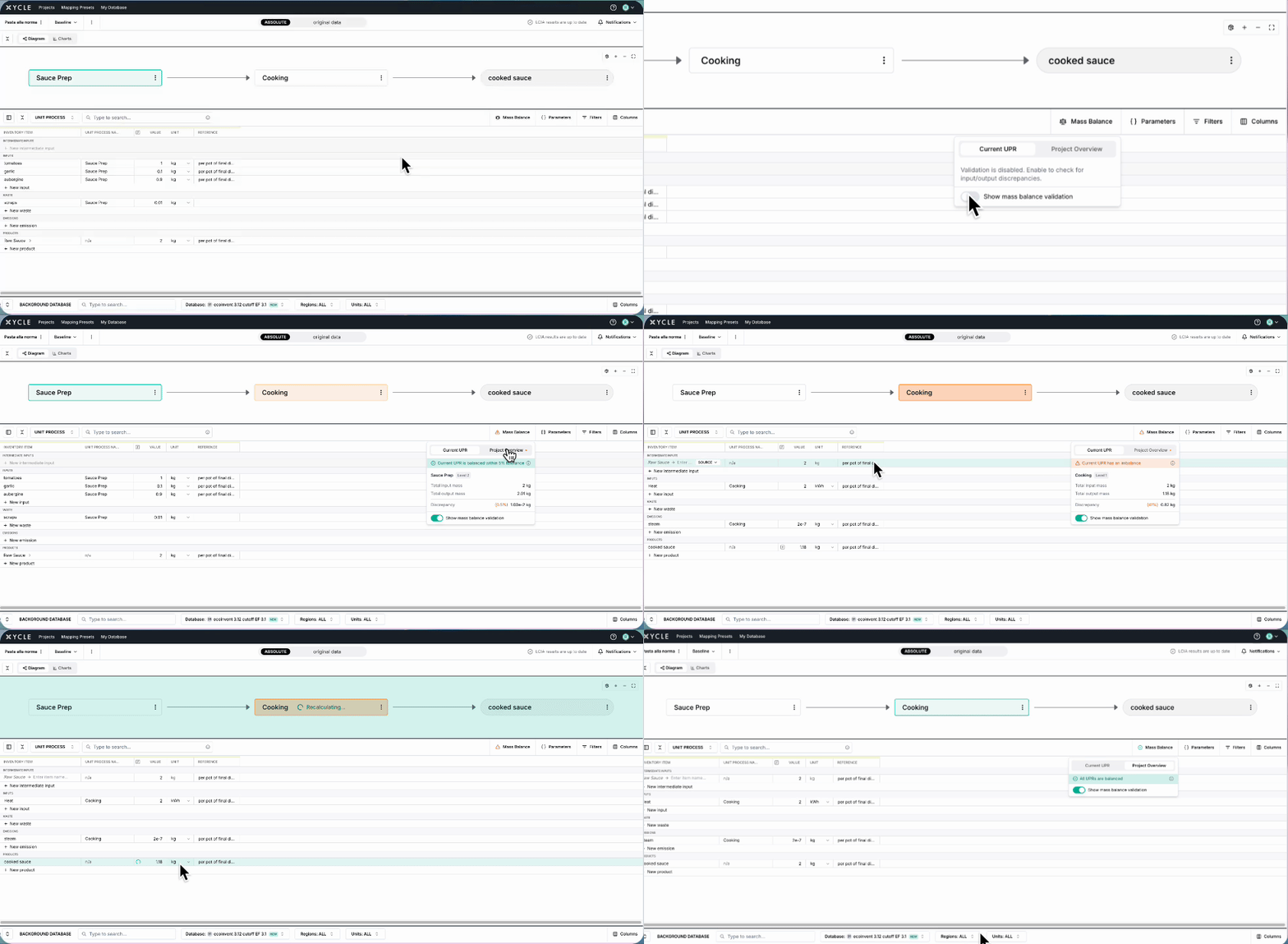
- Click on the mass balance button,
- Turn on the validator and
- Start entering input and output masses.
Tips
- Always define a unit if an inventory item is to be considered
- Don’t define a unit if you don’t want it to be considered.
If using the BOM importer
- When importing a BOM with weight and material quantity, these are automatically multiplied in the value cell. For example Weight [kg] = 2 and Material QTY = 100:
- Total mass (200 kg) is used for calculations (mass balance, emissions)
- Per-unit mass (2 kg) is derivable/visible
Therefore the impact of an inventory item can be determined as well as the total contribution of an inventory item to the model.
Appendix
|
Input Mass |
Output Mass |
Conversion Rate |
|
"kg", "Kg", "KG", "kgs", "kilogram", "kilograms" |
kg |
1.0 |
|
"g", "Gram" |
kg |
1e-3 (0.001) |
|
"mg" |
kg |
1e-6 (0.000001) |
|
"μg", "ug" |
kg |
1e-9 (0.000000001) |
|
"ng" |
kg |
1e-12 (0.000000000001) |
|
"t", "T", "tn", "ton", "tons", "tonne", "tonnes" |
kg |
1e3 (1000.0) |
|
"kt" |
kg |
1e6 (1,000,000.0) |
|
"mt", "Mt" |
kg |
1e9 (1,000,000,000.0) |
|
"Gt" |
kg |
1e12 (1,000,000,000,000.0) |
|
"lb", "lbs" |
kg |
0.45359237 |
|
"US ton", "US tons" |
kg |
907.18474 |
|
"troy ounce", "troy ounces", "toz" |
kg |
0.0311034768 |
|
"kg C", "kg/seedling", "kg/unit" |
kg |
1.0 |