.png?width=200&height=58&name=Primary_White_XYCLE_Logo.png-09%20(2).png)
Custom datasets allow you to integrate project-specific data into your impact calculations. Previously referred to as custom characterisation factors, these datasets help reflect supplier-specific values, updated environmental information, or alternative modelling assumptions. This guide walks you through how to define, map and apply them within the XYCLE platform.
1. Select the Project Database
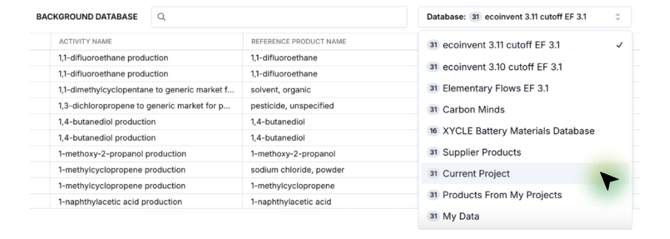
To begin, navigate to the Background Database dropdown and select Project. This ensures any custom datasets you define will be stored within your project and not applied globally.
2. Click “New Custom Dataset”
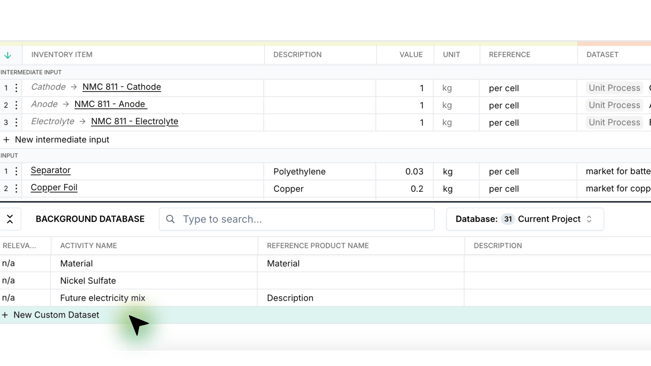
Once the database is set to Current Project, click + New Custom Dataset at the bottom of the list. This opens a new row for your custom entry.
3. Name the New Dataset
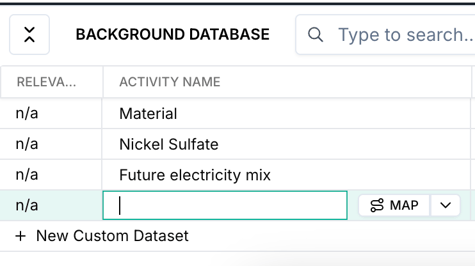
In the “Activity Name” cell, enter a clear and descriptive name. This should reflect the material, substance or activity you are defining for impact assessment.
4. Add the Reference Product and Region
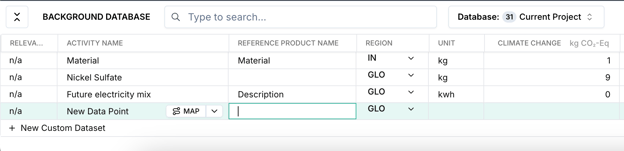
Specify both the Reference Product Name and Region. These details are essential for linking your dataset to the correct inventory item and regional data.
5. Define the Dataset Values
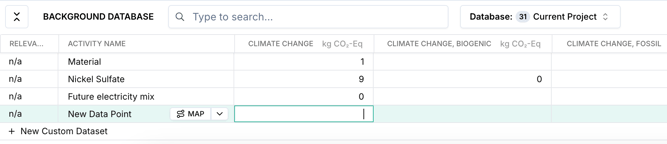
Input the values for each impact category relevant to your assessment. This typically includes:
-
Climate change (e.g. kg CO₂-eq)
-
Acidification
-
Water use
-
Any other categories used in your project
Ensure consistency in units across all entries.
6. Map the Dataset
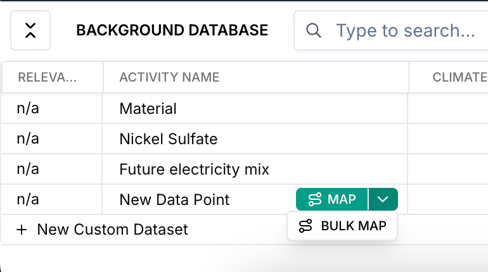
After entering your values, click MAP next to the custom dataset. This step prepares the data for use in your inventory mapping.
7. Assign the Factor to an Inventory Item
Link your dataset to the relevant inventory item. Once assigned, your custom data will be used in place of default values when calculating impacts.
Summary
Custom datasets (formerly known as characterisation factors) provide greater flexibility and control when working with non-standard or updated impact data. They’re ideal for projects using supplier-specific values, exploring different modelling scenarios or reflecting local conditions. Always ensure unit consistency and that your Reference Product Name exactly matches the entry used in your inventory.